
New ASIN
Launch a New SKU with the Ad Ready
Upload the hero product shot, get a Sponsored Display creative in the compliant text ratio the same afternoon the listing goes live.
Paste a product URL and Oginify reads it like an Amazon reviewer — price tags off, Prime badge gone, ratings hidden, headline painted onto a lifestyle scene sized for Sponsored Display.
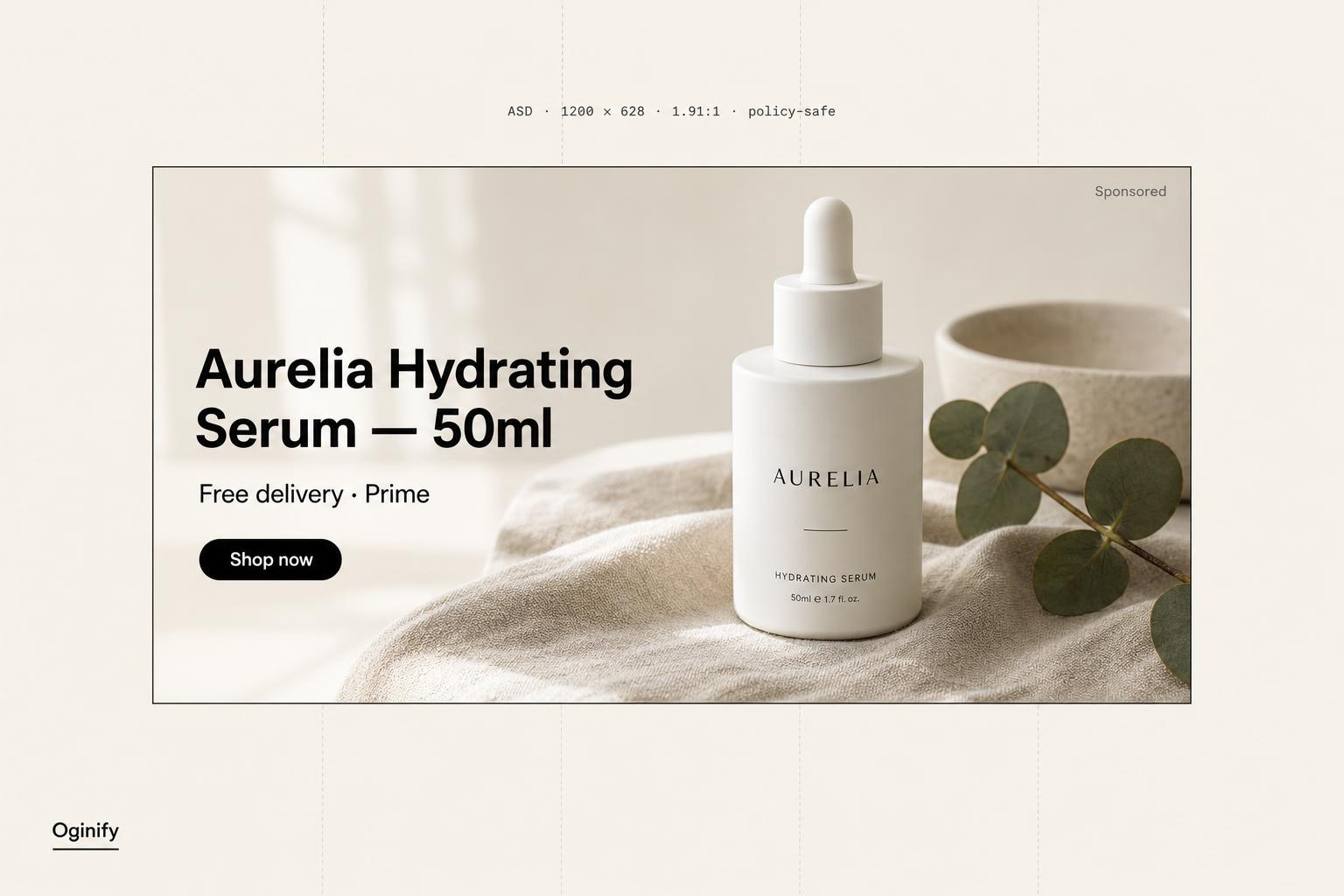
Amazon Ads enforces a reviewer checklist most templates ignore. Each rejected upload costs 24–72 hours of campaign time. Oginify treats that checklist as the design brief, not an afterthought.
Amazon reviewers reward in-context product photography over white-background pack shots. Every creative is composed as a real-world scene — natural light, props that imply use, a human moment when the category allows it.
Price tags. Prime icons. ★ review stars. '#1 Best Seller' badges. These are the four most common rejection reasons in Amazon Ads policy logs — Oginify's prompt guardrails strip all four before paint, not after.
Headline, logo and any overlay copy are sized inside Amazon's recommended ~20% text-area budget. Computed pixel-by-pixel against the 1200 × 628 frame, not estimated.
Custom image is a Brand Registry-gated format. Oginify pulls your logo as a transparent PNG, locks brand fonts where available, and renders a creative that matches the brand store reviewers cross-check against.
Sponsored Display rejections rarely come from bad design — they come from a 30-character headline that runs to 31, a logo cropped by the right-rail safe area, or an image that reads fine on a detail page and disappears in the customer-review slot. The custom-image upload flow punishes anything built in a generic banner tool and re-pasted in.
Point it at the ASIN you're defending against a competitor's headline bid, a hero product you're pushing into the off-Amazon network on Twitch and IMDb, a seasonal SKU that needs a fresh creative every week, or a new launch with no review history to lean on. Oginify reads the listing once and emits an upload-ready JPG that clears the reviewer on the first pass.
Run it yourself with our MIT-licensed Agent Skill, let Oginify paint the creative, or hand-craft it in a template editor.
| Oginify Managed, policy-aware | Amazon Creative Studio Free, in-console | Canva / DIY Template editor | |
|---|---|---|---|
| Output ratio | 1200 × 628 (1.91:1) | 1200 × 628 | Manual canvas resize |
| Brand match | Auto-detected from URL | Pulls from your ASIN | Your tokens, your time |
| Under 20% text | Sized to clear by default | You eyeball it | You eyeball it |
| Lifestyle composition | Painted, not pasted | Limited templates | Up to you |
| Policy guardrails | Price · Prime · stars blocked | Manual review | Easy to break by accident |
| Setup | Paste a URL | Inside Amazon Ads console | Sign up + drag editor |
| Cost | Free · $0.99 optional tip | Free | Freemium · $13/mo Pro |
| Best for | Ship one creative right now | Stay in Amazon's UX | Hand-crafted single asset |
One SKU in, an Amazon-safe Sponsored Display creative out — 1200×628 with headline zone, price and CTA already placed.
New ASIN
Upload the hero product shot, get a Sponsored Display creative in the compliant text ratio the same afternoon the listing goes live.
Peak season
Rerun the generator per ASIN with the promo hook so the storefront reads as one campaign, not a folder of one-offs.
Creative A/B
Generate two variants that only differ in the top-line copy — hand both to Amazon's rotation and let CTR decide.
Solo seller
Solo Amazon sellers running their own ads get on-policy creatives without a Fiverr round-trip.
Paste your product page. Oginify reads the ASIN context, paints a reviewer-ready lifestyle image, and hands you an upload-ready 1200×628 JPG in seconds.
Drop any Amazon detail or brand-store page in. We pull ASIN category, headline, palette and a transparent logo — no manual field entry.
Lifestyle composition with the product in-context, no watermarks, no borders, text pinned to under 20 percent of the frame — pre-checked against Amazon's reviewer blocklist.
Download a horizontal 1200×628 sRGB JPG under 5 MB, ready to drop into Sponsored Display detail, search or off-Amazon placements.
Amazon's custom-image spec, moderation traps, and why creatives get rejected.
1200 × 628 pixels at a 1.91:1 ratio, delivered as JPG or PNG under 5MB in sRGB. Anything else is rejected at upload. Oginify paints to that exact spec by default, so the download uploads cleanly without a resize step in Photoshop.
The four most common rejections are: price or discount text in the image, star ratings or best-seller badges, more than roughly 20% of the image covered in overlaid text, and borders or frames around the edge. Amazon's automated moderation flags all four in seconds — Oginify prompts avoid them by construction.
On Amazon: below the Buy Box, on detail pages, on search and category pages, and in the customer-review section. Off Amazon: across the display network including Twitch, IMDb and partner publishers. The 1200×628 image anchors every placement.
Lifestyle is preferred — Amazon's own guidance encourages showing the product in use, not on a white studio background (that's what the standard product image is for). Oginify defaults to lifestyle composition; the wildcards include studio, editorial and packshot variations for A/B testing.
Yes — Sponsored Display custom-image ads are limited to sellers and vendors enrolled in Amazon Brand Registry. Standard Sponsored Products don't require Brand Registry but also don't support the 1200×628 custom-image slot; the two ad types have different asset specs.
Creative Studio produces one AI variant from your product listing at a time. Canva requires you to build the composition manually. Oginify generates four brand-aware variants from your ASIN URL in a single pass, all pre-sized to 1200×628 and pre-checked against the moderation rules above.
Paste your ASIN. Back comes a 1200 × 628 JPG, a transparent-PNG logo, and a 30-character headline — cleared for reviewer moderation on the first upload.