
OSS maintainers on launch day
Ship a real card before the Hacker News + X + LinkedIn triple-post. The unfurl becomes the difference between a scroll and a star.
Paste a github.com/<owner>/<repo> URL and Oginify paints a 1200 × 630 card from the repo name, description, and primary language — ready for Settings → Social preview and every timeline unfurl.
Just pushed a new social preview for the repo. Way better than the default avatar card.

Upload the file at Settings → General → Social preview on your repository. Files render as 1280 × 640 across GitHub, X, Slack, and Discord.
GitHub's default social card is a beige rectangle with an avatar. Every unfurl looks identical to every fork. A one-time upload fixes it forever — GitHub caches the preview and reuses it across every share surface.
X, LinkedIn, Slack, Discord, and Notion all read the same og:image GitHub serves. Upload once, get a real card everywhere.
AI reads the primary language and picks a devtool-tuned palette — code-editor contrast, terminal cursor, no white-glare hero photo.
1200 × 630 PNG (≥ 640 × 320 minimum). Uploads cleanly at Settings → General → Social preview, no re-crop dance.
Regenerate for each major version or announcement — the release tweet and the changelog LinkedIn post now share a real thumbnail.
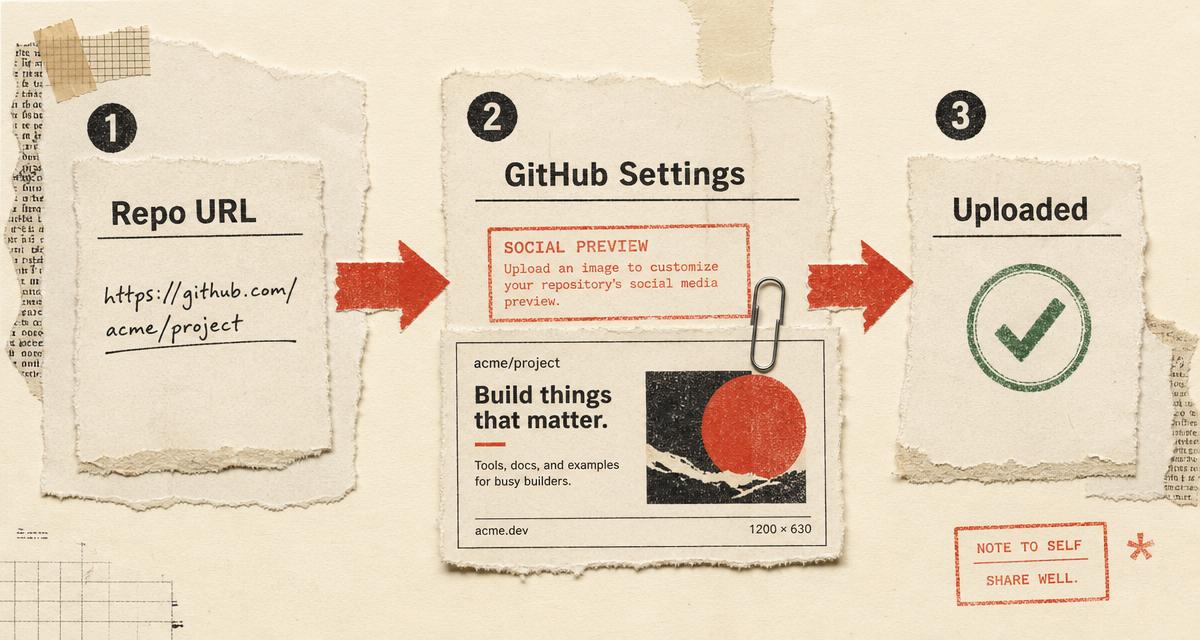
Every GitHub repo without a custom social preview unfurls as a beige rectangle with the owner avatar and the repo path — the same card as ten million forks. Ship a real card and the release tweet, the changelog LinkedIn post, and the Slack link-share suddenly earn a click. GitHub caches the image aggressively, so a good preview keeps working for months.
Use it when you cut a release and want the version tag to lead, when a maintainer picks up an issue thread and drops the repo link, when a founder posts the OSS launch on X, or when the docs site links back to the source. Oginify reads the repo, paints a devtool-tuned 1200 × 630 card, and hands you a PNG ready for Settings → General → Social preview.
| Oginify Repo-aware SaaS | GitHub default Owner avatar + repo name | Generic card tools Manual editors | |
|---|---|---|---|
| Output size | 1280 × 640 (GitHub spec) | Auto-composed by GitHub | Often 1200 × 630 only |
| Repo context | Name, description, stars, language pulled from GitHub API | Just owner and repo name | You retype everything |
| Terminal aesthetic | Monospaced, code-first layout | Plain avatar tile | Generic marketing look |
| Setup | Paste repo URL | Nothing to do | Sign up + design in an editor |
| Cost | Free · $0.99 optional tip | Free | Freemium or paid |
| Best for | Shipping a real social preview per repo | Personal side projects | One-off marketing images |
Not everyone needs one — but if the repo is a marketing surface, the default card is quietly costing you clicks.
Ship a real card before the Hacker News + X + LinkedIn triple-post. The unfurl becomes the difference between a scroll and a star.
Every changelog release earns a fresh preview. See the pattern for developers — a real card doubles social CTR on release announcements.
When a tutorial pastes ``https://github.com/you/repo``, the reader sees a branded card, not a stranger's repo.
Includes a polished preview in the handoff — client posts the link and the card carries their brand, not the developer's.
Three steps between an empty repo card and a preview that unfurls everywhere.
Drop any public github.com/<owner>/<repo> link. Oginify reads the repo name, description, primary language, and star count through the GitHub REST API — no OAuth, no scopes.
The pipeline picks a devtool-tuned style (terminal, magazine, brutalist, or mark) based on your language and description, then paints a 1200 × 630 PNG with real typography and language-native contrast.
Download the PNG. Go to your repo → Settings → General → Social preview → Upload an image. GitHub caches it and reuses it across every unfurl surface.
Everything about repo unfurls, image sizes, and the Settings → Social preview upload.
GitHub recommends at least 640 × 320px and displays a maximum of 1280 × 640px. Oginify outputs 1200 × 630 PNGs — inside the recommended band and identical to the Open Graph standard used by X, LinkedIn, and Slack, so one file covers every unfurl surface.
Open your repository, click Settings, then General. Scroll to the Social preview section and click Edit → Upload an image. GitHub caches the preview immediately and reuses it whenever anyone shares the repo URL.
A README banner shows on the repo page itself. A social preview is the og:image GitHub serves to X, LinkedIn, Slack, Discord, and every other link-unfurl. They are two separate uploads — most repos benefit from both, but only the social preview affects social CTR.
The GitHub REST API only returns metadata for public repositories. If your repo is private, either flip it to public temporarily, or use [Text to OG Image](/text-to-og-image) and describe the repo manually — the same pipeline paints the card from a prompt.
Indefinitely for that upload — GitHub replaces the cache only when you upload a new file. Some social platforms (X, LinkedIn) also cache the unfurl on their side; use their card debuggers to force a re-fetch if the old default keeps showing after upload.
Repository social previews only cover individual repositories. Organizations and user profiles use their avatar for unfurls. For a repo inside an org, the flow is identical — paste any public github.com/<org>/<repo> URL and upload the result to that repo's Settings.
GitHub caches the upload forever — a five-minute generate saves every launch tweet, every release post, and every Slack share from the default beige card.