
New guide
Announce a Fresh Concept Page
Big new section? Ship the guide, the release note and a card that carries the guide H1 verbatim.
API reference, quickstart and conceptual guides each deserve their own card — endpoint chip, section crumb and a code sample instead of the same wordmark under every URL
SaaS · stacklane.com
A shared docs link on Slack that shows a generic product wordmark tells the reader nothing. Oginify pulls the H1, the section path and the first parameter table row, so the unfurl becomes 'Webhooks / Verify signatures' — the reader knows whether to click before they do.
E-commerce · kestrel & co
Merchant help pages get shared in customer emails and support macros. A card that says 'How refunds settle' in the brand serif reassures the buyer that they landed on the real help center, not a phishing mirror.
Content & media · the meridian
Editorial style guides and contributor handbooks live in Notion or docs sites and get shared internally on every new hire. The card renders the section name in the publication's serif so the guide reads as part of the masthead, not a generic wiki.
Dev tool · forge.dev
Engineers grep docs by endpoint name. A card that renders `forge deploy --preview` in monospace tells the reader on Hacker News exactly what page they'd land on — the click is a fair trade instead of a bait-and-switch.
Docs URLs get pasted into Slack, GitHub issues and Discord threads all day. The card should tell you which section you are being sent to.
New guide
Big new section? Ship the guide, the release note and a card that carries the guide H1 verbatim.
Section
A single generic docs card across 800 pages helps no one — the section name in the image tells the reader where the link goes.
Support
When support pastes a docs link, the card should preview the exact page — Rate limits or Webhooks, not just Documentation.
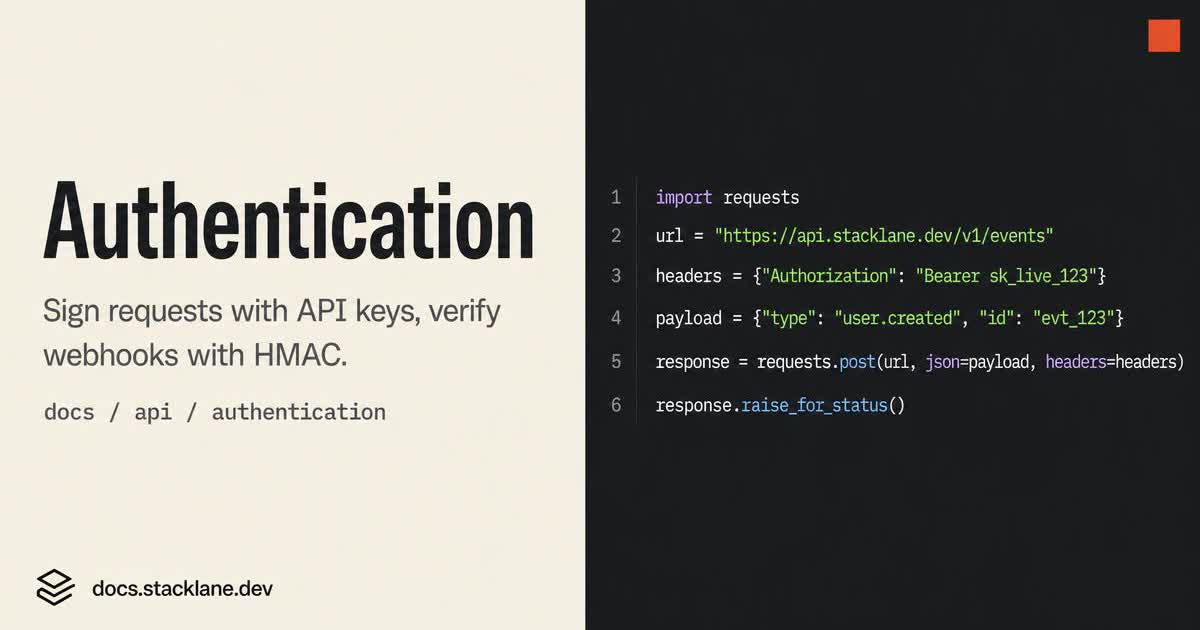
Every route in /docs deserves a card built from its own H1 and section — 'Authentication', 'Webhooks', 'CLI reference' — not one generic 'Documentation' image.
The generator reads the current page H1 and its section from the page you submit; the pair becomes the card's headline and kicker.
Docs share cards look right in code chrome: monospace headline, muted paper background, one syntax-colored token or endpoint per card.
When an edit renames a page, re-run its URL, download the new card and replace the image its og:image tag points to.
HomepagePricing pagesArticles & blog postsCase studies & customer storiesChangelog & release notesComparison & vs pagesAbout & company pages
Fallback Q&A for hub and category pages that don't yet have a dedicated FAQ row.
Paste your page URL on the homepage. Oginify reads the page and paints four 1200×630 cards in about 30 seconds — no signup, no prompt, no template picker. Download the PNG and paste the ready-made <meta> block into your <head>.
1200×630 pixels at 1.91:1. Every card Oginify outputs hits that spec exactly, so X, LinkedIn, Slack, Discord and iMessage all render the large-card layout consistently.
No. The URL is the entire input for the default entry point. Text-to-OG and image-to-OG entry points exist for cases where a URL isn't available yet.
Yes — 6 image generations per day without an account, no watermark, native 1200×630 PNG. Upgrade for higher daily caps when you need more.
Any framework or CMS that lets you edit <head> or accept a custom og:image URL — Next.js, Astro, Nuxt, Remix, WordPress, Ghost, Sanity, Contentful, Notion, Framer, Webflow, and every static-site generator fed by them.
Every reference URL becomes a card that names the section and the command, so the Slack unfurl is the answer, not a placeholder.